Writing 10 min read
Spark notebooks through Kong: rebuilding an HDInsight setup in my lab
I wanted to see how Kong handles traffic that has nothing to do with AI, so I followed Microsoft's HDInsight article on connecting a local Jupyter to Spark through Livy, and put Kong where the HDInsight gateway sits.
My last two Kong posts were all about language models: putting Kong in front of my local LLM and watching the agents that use it. I wanted more exposure to how Kong could be used for something else, so I went back to something I know well from my years supporting Spark and Livy on Azure HDInsight.
Microsoft has an article called
Install Jupyter locally and connect to Spark in Azure HDInsight.
You install Jupyter and sparkmagic on your own computer, point them
at https://CLUSTERNAME.azurehdinsight.net/livy, sign in with the cluster login, and your notebook cells run on the
cluster. The interesting part, for me, is the address. The notebook never talks to the cluster’s machines. It talks
to one HTTPS endpoint, and a gateway in front of the cluster checks who you are before anything reaches Livy.
So I tried to rebuild that setup in my lab, with Kong in the gateway’s place. This post is what it took, what I learned about Kong along the way, and a look at what a notebook actually sends through the gateway.
The idea
/livy route on Kong. kong01 is the same gateway as in my last Kong post, with one
route added.
The lab side has four parts:
- sparkmagic01 is a new VM that plays “your computer”: Jupyter Notebook 7 and sparkmagic, and nothing else. There is no Spark on it. Every PySpark cell becomes an HTTP request to Livy.
- kong01 is the same Kong Gateway 3.16 from my last post, still serving my AI routes. It gets one new route,
/livy. - livy01 runs Apache Livy behind nginx, with its own TLS and its own login. Each notebook’s Spark driver runs here.
- The cluster is a small Spark 4.2 cluster I built on Proxmox: a master and four workers, with Delta Lake tables on S3 and one shared Hive Metastore.
Following the article, seven years later
The article pins sparkmagic 0.13.1, which came out in 2019. Most of the steps still made sense; a few have moved on.
| The article says | What I did |
|---|---|
| Install Python and Jupyter (Anaconda) | A Python 3.13 virtual environment with Jupyter Notebook 7.6 |
pip install sparkmagic==0.13.1 |
sparkmagic 0.23.0, the current release |
jupyter nbextension enable --py --sys-prefix widgetsnbextension |
Not needed anymore: ipywidgets 8 brings its own extension for Notebook 7 |
jupyter-kernelspec install the Spark, SparkR, PySpark and PySpark3 kernels |
PySpark and Spark. The PySpark3 kernel no longer exists, and I skipped SparkR because my cluster has no R |
jupyter serverextension enable --py sparkmagic |
jupyter server extension enable --py sparkmagic |
Create ~/.sparkmagic/config.json |
The same keys, pointed at Kong |
The config file is where the article and the lab meet. This is mine, with the password left out:
{
  "kernel_python_credentials": {
    "username": "analyst",
    "base64_password": "...",
    "url": "https://kong01.lab:8443/livy",
    "auth": "Basic_Access"
  },
  "custom_headers": { "X-Requested-By": "livy" },
  "heartbeat_refresh_seconds": 5,
  "livy_server_heartbeat_timeout_seconds": 60,
  "heartbeat_retry_seconds": 1,
  "session_configs": { "driverMemory": "1000M", "executorCores": 2 }
}
The X-Requested-By header comes straight from the article, and I finally understood why it is there: Livy has a
CSRF check that refuses any POST or DELETE without it. The url is the only line that really changed. To sparkmagic,
Kong is just “the cluster”.
One thing I noticed while installing: sparkmagic still depends on requests-kerberos. I didn’t want Kerberos
anywhere near this. The HDInsight gateway takes a username and password over HTTPS, and so does mine. So I left the
compiled Kerberos libraries out of the install. sparkmagic only needs the small Python part at start-up, and only
uses Kerberos if you choose it.
Adding the route to Kong
The Kong side is one service, one route and one consumer, added next to the AI routes. Here is the core of it, with the secrets replaced by placeholders:
services:
  - name: spark-livy
    protocol: https
    host: livy01.lab              # the name on livy01's certificate (more on this below)
    tls_verify: true              # Kong checks livy01's certificate...
    ca_certificates: [<spark-lab-ca>]   # ...against the CA that signed it
    routes:
      - name: livy
        paths: ["/livy"]
        strip_path: true          # /livy/sessions reaches Livy as /sessions
        protocols: ["https"]
        plugins:
          - name: basic-auth      # the "cluster login"
            config: { hide_credentials: true }
          - name: request-transformer
            config:               # Kong's own login for livy01's nginx
              add: { headers: ["Authorization:Basic <kong's livy credential>"] }
          # ...plus pre-function, key-auth and rate-limiting (next section)

upstreams:
  - name: livy01.lab
    host_header: livy01.lab
    targets: [{ target: 192.168.1.57:8443 }]

consumers:
  - username: spark-notebooks
    basicauth_credentials:
      - username: analyst
        password: <from the secrets file>
A few things about doing this in Kong made me like it more than I expected to:
- The notebook never sees Livy’s password. The client signs in to Kong as
analyst. Kong removes that login and adds its own for Livy. The Livy password lives on the gateway and nowhere else. - The new traffic shows up next to the old. The
spark-notebooksconsumer lands in the same request log and the same Prometheus metrics asclaude-codeandopenai-apps, with no extra setup. - Changing the gateway felt safe. My Kong setup renders the configuration, checks it with
kong config parse, and only then reloads, without dropping connections. Before and after adding the route, I ran the 18 checks I use for the AI routes (Claude Code, both APIs, streaming, keys, limits). All 18 passed both times.
Global plugins and route plugins
This was the part I learned the most from. My Kong setup has five global plugins, and they were written for the AI
routes. One of them is a small Lua function that copies a Bearer token into x-api-key and then removes the
Authorization header, because the model server shouldn’t see it. That is exactly the header basic auth needs.
The global key-auth would also have answered 401 to every notebook, since sparkmagic doesn’t send an API key. And the
global rate limit of 120 requests a minute turned out to be far too low for notebooks (more on that below).
I couldn’t switch the global plugins off for one route, and I didn’t want to touch them, so I read up on how Kong decides between them. Kong’s plugin documentation has a section on plugin precedence: a plugin configured on a route takes precedence over the same plugin configured globally, which has the lowest precedence of all. So the Livy route got its own version of each plugin that was in the way:
/livy the global pre-function, key-auth and rate limit would
have got in the way, so each has its own version on the route. An AI key alone gets a 401 here: key-auth recognizes it,
but basic-auth still wants the cluster login.
The key-auth one took me a moment. Kong’s auth plugins each require their own credentials by default; an anonymous
consumer is how one of them lets a request through without them. Kong’s
how-to on multiple authentication methods uses
that to let clients choose between methods. Here I used it the other way around: key-auth on /livy lets everyone
through as livy-anonymous, and basic-auth, which has no anonymous fallback, decides.
A small thing I noticed later in the metrics: when I sent one of my AI keys to /livy, the 401 was counted under
consumer="claude-code". key-auth runs first and recognized the key; basic-auth refused the request afterwards.
Who answered?
In my first Kong post, the habit that helped most was reading the response
headers to see which layer wrote the answer. It worked here too. These are real responses from the /livy route:
| What I sent | Status | Server |
Written by |
|---|---|---|---|
| No login | 401 | kong/3.16.0.1 |
Kong, on its own |
| An AI API key instead of the login | 401 | kong/3.16.0.1 |
Kong, on its own |
| Plain HTTP | 426 | kong/3.16.0.1 |
Kong, on its own |
A POST without X-Requested-By |
400 | nginx + Via: kong |
Livy, through Kong |
| The right login | 200 | nginx + Via: kong |
Livy, through Kong |
The two 401s came with WWW-Authenticate: Basic realm="service", the 426 said “Please use HTTPS protocol”, and
Livy’s 400 said “Missing Required Header for CSRF protection”. (The full Server values are
kong/3.16.0.1-enterprise-edition and livy01’s nginx/1.28.3 (Ubuntu).)
When Kong answers alone, the response carries X-Kong-Response-Latency. When Livy answers, it carries
X-Kong-Upstream-Latency and X-Kong-Proxy-Latency instead. The Prometheus metrics say the same thing with a label:
source="kong" for the 401s Kong wrote, source="service" for Livy’s 400.
One notebook on the wire
I wanted to see what a notebook actually sends through the gateway, so I ran the PySpark sample notebook once and pulled every request for that run out of Kong’s request log.
| # | Cell (Livy statement) | Sent at | Result at | Took |
|---|---|---|---|---|
| 1 | sparkmagic checks that 'spark' exists | 13.5 s | 15.7 s | 2.3 s |
| 2 | print(spark.version) | 15.7 s | 15.8 s | < 0.1 s |
| 3 | %%sql SHOW DATABASES | 16.2 s | 25.4 s | 9.3 s |
| 4 | %%sql SELECT city, count(*) … | 29.3 s | 48.6 s | 19.3 s |
| 5 | %%sql -o by_city … | 53.2 s | 55.5 s | 2.3 s |
| 6 | DataFrame groupBy().show() | 56.8 s | 59.0 s | 2.2 s |
| 7 | saveAsTable (Delta) + DESCRIBE DETAIL | 59.1 s | 70.4 s | 11.3 s |
livy, consumer spark-notebooks. Eight cells, but two of them
don't become statements: %%info only asks for the list of sessions (the small mark at 0 s), and
%%local runs on sparkmagic01 itself. The first statement is sparkmagic checking that spark exists. "Result at" is the
poll that brought the finished result back. Kong's own time was 0–2 ms on every one of the 96
requests; the seconds are Livy and Spark.
A few things stand out:
- Most of the traffic is waiting. Of the 96 requests, 86 are sparkmagic asking “is it done yet?” about once a second: the session’s state while Livy starts the driver, then each statement’s result. That polling is why the Livy route has its own rate limit. One notebook sent 96 requests in 70 seconds, so two notebooks open at once would have run into the 120-a-minute limit I set for the AI agents. The route allows 1,200.
- The gateway costs almost nothing. Kong’s own time was between 0 and 2 milliseconds on every request in this run. Across all 1,484 successful Livy calls during my testing, the median was 1 ms and the slowest was 4 ms. The seconds in the table belong to Livy and Spark. I didn’t dig into why the first catalog query and the first aggregation take longer; Kong’s share of each is a millisecond or two.
- The session goes away with the kernel. Shutting the kernel down sends a
DELETE, and Livy stops that notebook’s Spark driver. If the notebook just disappears, the missed heartbeats and Livy’s idle timeout clean up.
What it looks like
This is the PySpark notebook running through Kong. sparkmagic shows the Livy session it created (the “YARN
Application ID” column is a reminder that Livy grew up on YARN; my cluster uses Spark’s standalone cluster manager, so
it’s empty), then
%%sql results with its chart-type buttons. demo.trips is a Delta table I created from a different notebook
environment on the same cluster; both see it because they share the Hive Metastore.
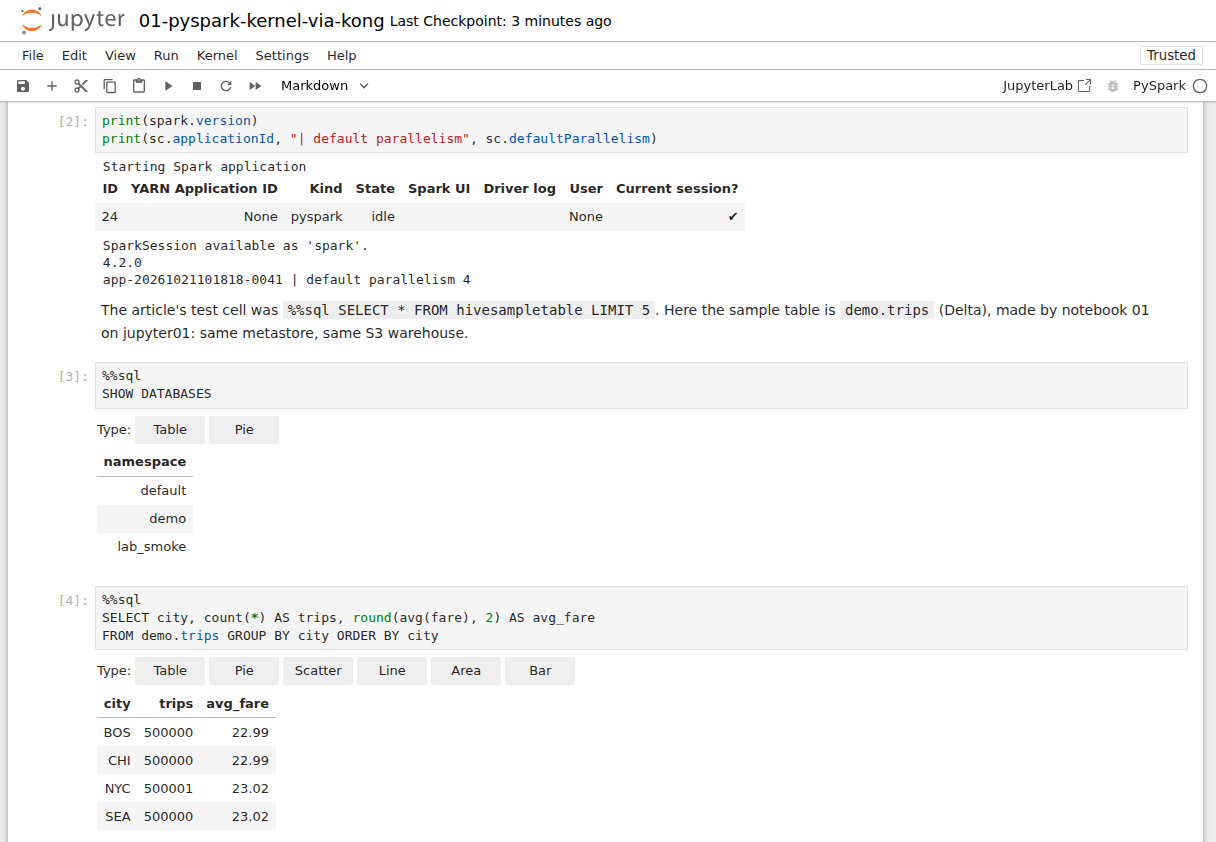
The PySpark kernel on sparkmagic01. Every cell here went from the notebook to Kong, and from Kong to Livy.
%%sql -o by_city copies a result back to the notebook machine as a pandas DataFrame, and %%local runs a cell
there instead of on the cluster. The demo data has exactly 500,000 trips per city (one has 500,001), so the bars
match. The point is where each step ran.
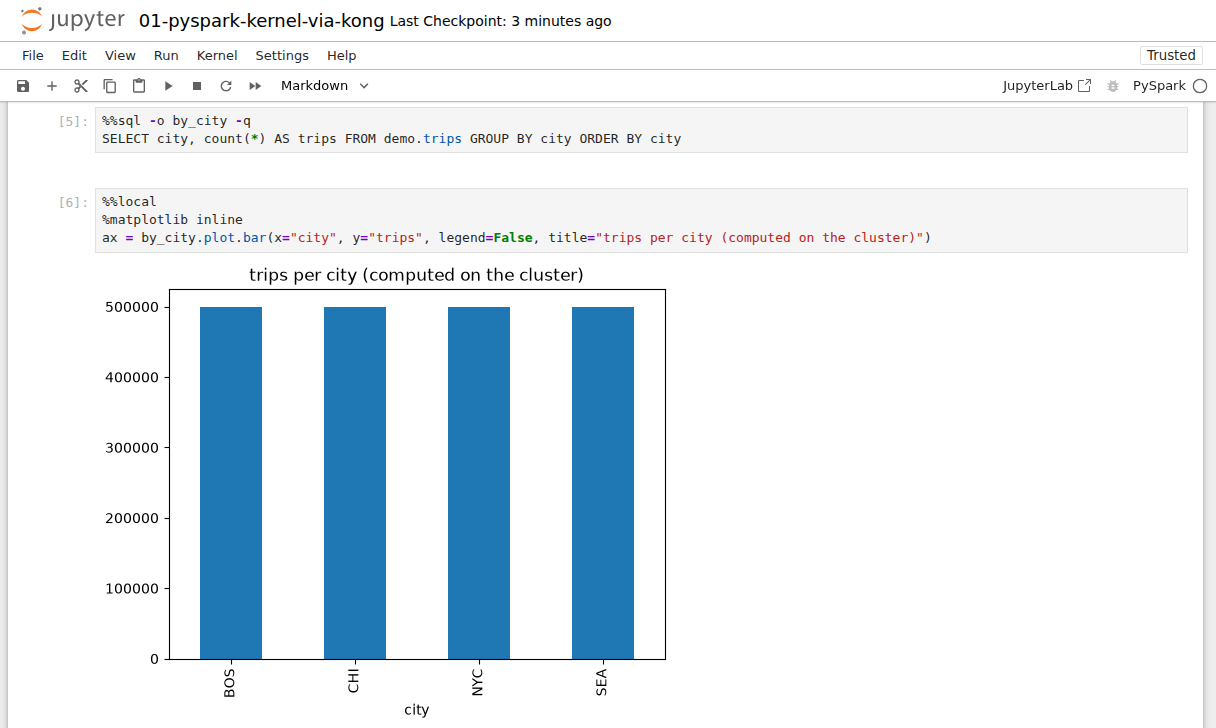
The query ran on the cluster; the chart was drawn on sparkmagic01.
Two things I didn’t expect
Kong wouldn’t trust livy01 by its IP address
My first version of the service pointed straight at https://192.168.1.57:8443, and every request came back 502.
Kong’s error log said why:
upstream SSL certificate does not match "192.168.1.57" while SSL handshaking to upstreamlivy01’s certificate does list that IP address, so I expected it to work. What fixed it was giving Kong a name to
check instead: an upstream entity called livy01.lab, the name on the certificate, with host_header set to the same
name and the IP address as its target. With an upstream and no host_header, Kong still checked the certificate
against the target’s IP. With both in place, the certificate check passed, and Kong didn’t need DNS for the name.
The first %%sql failed, and it wasn’t the gateway
With everything working, the first %%sql cell of every PySpark session failed with sparkmagic’s “Cannot parse
object as JSON”. The second one worked. A new component in the path is always the first suspect, but Kong’s request
log showed every request answered with a 200.
So I took the layers one at a time. I sent the exact code sparkmagic generates for %%sql to Livy myself, through Kong,
and looked at the raw output. The rows were there, one JSON object per line, followed by this:
.../pyspark/sql/classic/dataframe.py:178: UserWarning: The return type of DataFrame.toJSON will be
changed from RDD to DataFrame in future releases.
Spark 4.2 warns the first time a session calls toJSON(). Livy returns that warning in the same output as the
results, and sparkmagic tries to read every line as JSON. Python shows a warning only once per session, which is why
the second cell worked. Scala sessions never had the problem.
I fixed it on the notebook side, so the cluster stays as it is: a small startup file that Jupyter runs in every kernel, which drops Python warning lines before sparkmagic parses the output. Anything else that isn’t JSON still fails, as it should.
What I would write down for next time
- Read the
Serverheader first.kong/…withX-Kong-Response-Latencymeans Kong refused the request on its own.nginxwithVia: kongmeans Livy, or the nginx in front of it, answered. - A 401 on
/livyis the cluster login. An API key alone isn’t enough, by design. - Check which plugins really run on a route. A plugin on the route replaces the global one of the same name.
GET /pluginson the Admin API shows both. - For a 502, read Kong’s error log. Here it named the exact certificate problem.
- Count the polls. sparkmagic sends about one request a second per running cell. Size the route’s rate limit for that, not for the number of people.
- If only the first
%%sqlfails, look at the statement’s raw output. On Spark 4 it may be a warning, not a bug in the gateway.
What is in the box
| Piece | Version | Role |
|---|---|---|
| Kong Gateway | 3.16.0.1 (kong/kong-gateway image), DB-less, in Docker on kong01 |
the /livy route next to the AI routes: basic-auth, key-auth, rate-limiting, request-transformer, prometheus, file-log |
| Jupyter Notebook + sparkmagic | 7.6 / 0.23.0, Python 3.13, on sparkmagic01 | the “local” Jupyter from the article |
| Apache Livy | built from the project’s main branch (no release supports Spark 4 yet), behind nginx on livy01 | REST sessions and statements |
| Apache Spark + Delta Lake | 4.2.0 / 4.4.1, a master and four workers | runs the cells |
The usual caveats apply: one gateway, one Livy server, one person using it, on a quiet LAN. And there is a gap I can
already see. Everyone who uses sparkmagic01 signs in as the same analyst, so Kong sees one consumer, and Livy can’t
tell whose session is whose. The HDInsight article ends with a warning about exactly that: with several people running
notebooks against one cluster, “it will be a complex task to track which Livy session belongs to which user.” A
gateway seems like the right place to fix it: a login per person, or short-lived tokens with Kong’s JWT plugin, and
then passing the person on to Livy so each session carries a real user name. That is what I want to try next.