Writing 12 min read
Watching my AI agents through Kong: metrics, logs and one shared timeline
In my last Kong post I broke requests one at a time and read the evidence by hand. This time I asked what the gateway can tell me over hours and across several agents at once, and put its metrics next to the model server and the GPUs.
In my last Kong post, I broke requests on purpose and followed each failure by hand: the response headers, one file-log line, the error log, the model server’s counter. That works when you already know which request to look at. Most of the questions I used to get in support started earlier than that: something is slow, something is using up the GPUs, it was fine yesterday. To answer those you need to see what happened over hours, not one request.
A gateway is in a good position to see that. Every request from every application goes through it, it knows who sent each one (the API key), and Kong’s AI plugins already count the tokens. So for this post I left the request path alone and added the other half: something that collects what Kong records, keeps it, and shows it next to what the model server and the GPUs were doing at the same moment.
The question I wanted to be able to answer by looking: when several coding agents share one local model, which one is doing the work, and what does that cost the model server?
The setup
Since the last post the lab has moved onto Proxmox. Kong now runs on its own VM, the agents on another, and a third VM does nothing but watch.
- kong01: Kong Gateway 3.16 in Docker, DB-less, one declarative YAML file. Clients use HTTPS. Two routes go
through ai-proxy:
/v1/messages(the Anthropic API, which Claude Code speaks) and/v1/chat/completions(OpenAI’s). - client01: the agents. Claude Code and the Anthropic SDK scripts share one API key, and the OpenAI SDK scripts
use another. In Kong each key belongs to a consumer, so
claude-codeandopenai-appsare the two identities the gateway sees. - bigai: SGLang serving Qwen 3.8 Flash Next on two RTX PRO 6000 Blackwell cards, unchanged from my earlier posts.
- obs01: Prometheus, Loki and Grafana. Prometheus scrapes Kong, SGLang and the GPUs every 15 seconds. A small agent on kong01 (Grafana Alloy) sends Kong’s request log to Loki.
Turning on Kong’s metrics
Kong’s Prometheus plugin exposes metrics on the status API. The plugin’s documentation says most of the detailed metrics are off by default, because they can create a lot of series. These are the switches I turned on, as a global plugin:
plugins:
  - name: prometheus
    config:
      per_consumer: true          # a consumer label on requests and bandwidth
      status_code_metrics: true   # kong_http_requests_total
      latency_metrics: true       # Kong's own time, the upstream's, the total
      bandwidth_metrics: true
      upstream_health_metrics: true
      ai_metrics: true            # requests, tokens, time to first token, per consumer
ai-proxy needs logging.log_statistics: true on each route for the token counts, which I already had from the last
post. I kept log_payloads: false, so no prompt or answer ever reaches a log.
The status API was already listening, so this is all it took. One thing confused me for a minute: right after a
restart, /metrics showed only memory, connections and node information, and none of the AI metrics. They appear
with the first request through a route that uses them. Prometheus then scrapes them like anything else. These are
the series one Claude Code request lands in, with that request’s values (trimmed):
kong_ai_llm_requests_total{ai_provider="anthropic",ai_model="qwen38-27b",
    consumer="claude-code",request_mode="stream",...} 1
kong_ai_llm_tokens_total{...,token_type="prompt_tokens",consumer="claude-code"} 49226
kong_ai_llm_tokens_total{...,token_type="completion_tokens",consumer="claude-code"} 83
kong_ai_llm_ttft_latency_ms_bucket{...,consumer="claude-code",request_mode="stream",le="250"} 1
kong_http_requests_total{service="llm-anthropic",route="anthropic-messages",code="200",
    consumer="claude-code",...} 1
kong_kong_latency_ms_bucket{service="llm-anthropic",route="anthropic-messages",le="10"} 1
Two things in there matter for everything below. The AI metrics carry a consumer label (Kong added it in 3.11),
so I can see tokens per agent. And ai_provider is anthropic here even though the model is Qwen. That is the
provider type configured on the route (SGLang also speaks Anthropic’s API), not who made the model.
Putting the agents on a timeline
To have something to look at, I ran five agents at once for eight minutes: one real Claude Code session doing small read-only tasks in a sample repository, two Anthropic SDK scripts that hold a growing coding conversation, and two OpenAI SDK scripts asking short questions. All of them went through Kong.
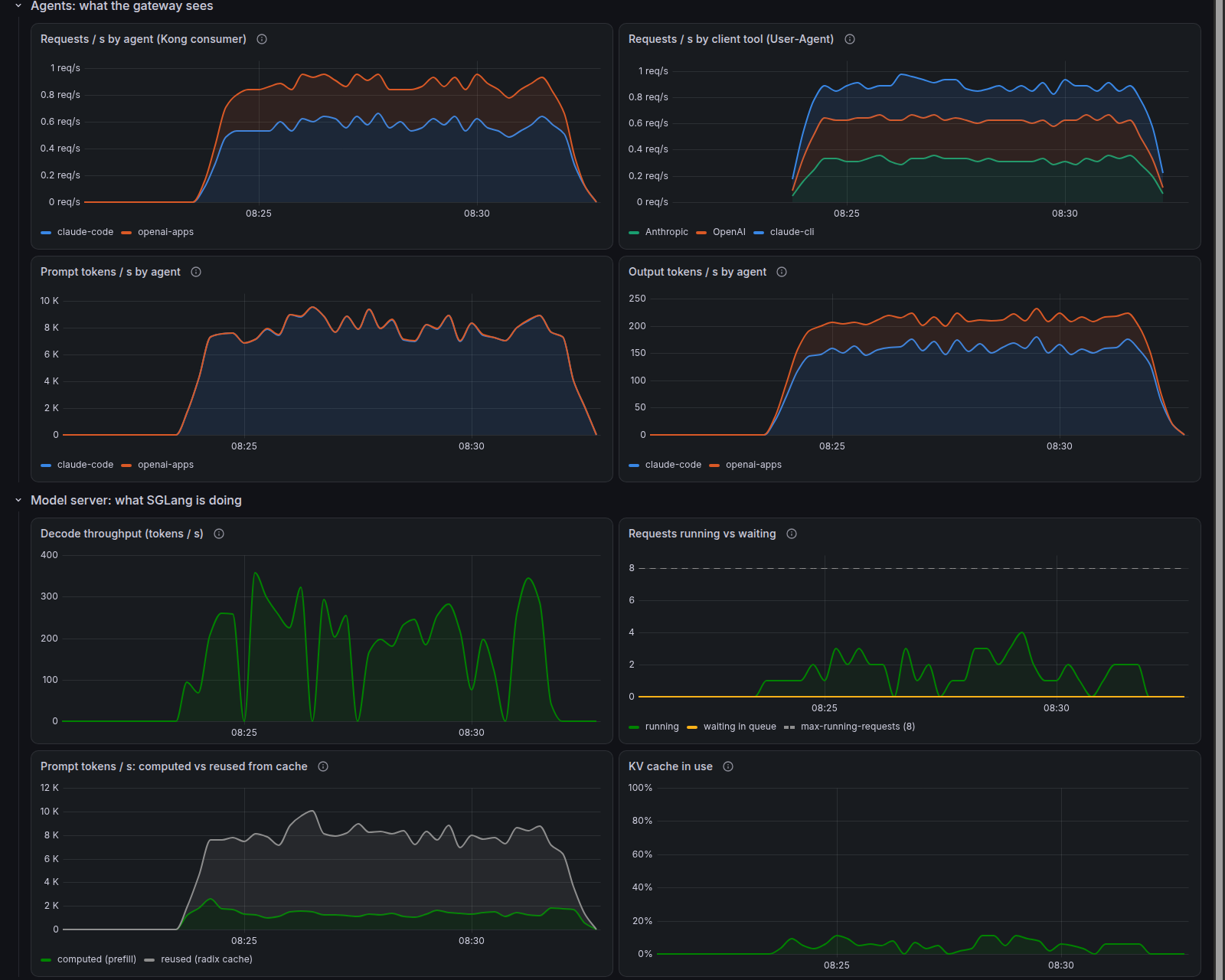
Eight minutes of five agents, from Grafana. Top: what Kong recorded, per consumer and per program. Bottom: what SGLang was doing at the same moment. Prompt tokens dwarf output tokens, and most of the prompt came from SGLang’s cache (grey, bottom left).
The top half is the gateway’s view: requests and tokens, per consumer and per program. The bottom half is SGLang and the GPUs. Because they share the time axis and the crosshair, a jump in one agent’s tokens lines up with the decode throughput, the queue and the GPU power at the same moment.
In those eight minutes Kong saw 445 requests to the model and no errors. 82% of them were streamed. The 45 small tasks I gave Claude Code turned into 134 requests: an agent goes back to the model after each tool it uses.
What the metrics told me
The consumer is the key, not the program
Kong’s metrics answer “which consumer”, and a consumer is an API key. In this lab Claude Code and an Anthropic SDK
script both used the claude-code key, and to Kong’s metrics they were one agent.
The request log has the answer, because each file-log line includes the request headers. Here is one line from Claude Code, trimmed to the fields I used:
{"consumer": "claude-code", "route": "anthropic-messages", "status": 200,
 "user-agent": "claude-cli/2.1.300 (external, cli)",
 "latencies": {"kong": 10, "proxy": 135, "request": 1167},
 "ai": {"prompt_tokens": 49226, "completion_tokens": 83,
        "time_to_first_token": 137, "time_per_token": 13.95}}
The User-Agent says claude-cli; the SDK scripts say Anthropic/Python and OpenAI/Python. Alloy reads each line
as it is written and counts requests and tokens per program as well as per consumer, so the dashboard can split one
key into the tools behind it. It is a workaround. The cleaner answer is one consumer per application, which Kong makes
easy. But in a support case you get the configuration the customer has, and the log already holds the detail.
In the dashboard above, that is the panel at the top right: the claude-code consumer on the left is really two
programs, the Anthropic SDK scripts and Claude Code itself.
Kong’s own time stays small
kong_kong_latency_ms is the time Kong itself adds: the plugins, authentication, routing and ai-proxy’s
rewriting of the request. Over the eight-minute run it was 0.8 ms at the median and 3.9 ms at the 95th percentile.
The largest was 15 ms, on a 22,000-token Claude Code request, which ai-proxy has to parse; the line above shows 10 ms
for a 49,000-token one. That is consistent with the last post, where I measured about a millisecond for small requests. Next to a model that needs seconds, the gateway is not where
the time goes.
Time to first token is really time to the response headers
kong_upstream_latency_ms sounds like “how long the model took”. For a streamed response, it isn’t. In the log line
above, the request took 1,167 ms in total, but the upstream latency (proxy) was 135 ms, almost exactly the logged time
to the first token (137 ms). That wasn’t a coincidence. Across all 1,615 successful streamed requests in Kong’s log, the
two numbers were within 2 ms of each other, and the upstream latency was a median of 3% of the whole request. For a
stream, both end when the response starts. The rest of the answer streams in after that and only shows up in the total.
Then the dashboard showed something that didn’t fit. Kong reported a median time to first token of 50 ms for the
claude-code consumer, while SGLang’s own median over the same eight minutes was 198 ms. A model can’t start
answering a 10,000-token prompt that quickly. So I sent one streamed request with a new 7,000-word prompt through
each route and timed every event on the client:
| One streamed request | Response headers arrived | First token arrived | Kong logged as time to first token |
|---|---|---|---|
Anthropic route (/v1/messages) |
90 ms | 2,562 ms | 83 ms |
OpenAI route (/v1/chat/completions) |
2,521 ms | 2,521 ms | 2,516 ms |
Kong’s number matches when the headers arrived, not when the first token did. On the OpenAI route that makes no difference, because SGLang sends its headers together with the first token. On the Anthropic route SGLang sends the headers right away, before the model has produced anything, so Kong’s “time to first token” left out the whole 2.5 seconds the model spent reading the prompt.
To find out why, I read the code. Kong’s Lua ships as plain text inside the image, so the cause is visible, even
though this part of Kong isn’t open source. ai-proxy records the time to first token the first time its streaming
filter runs, before it looks at what arrived. My streaming routes use response_buffering: false, so that events are
passed on as they arrive. In that mode Nginx runs the response filters once with an empty chunk as soon as the
upstream’s headers come in. That first, empty run is the moment Kong records. Two throwaway Kong nodes that differed
only in that one setting confirmed it: with buffering on, Kong’s time to first token was right.
Turning buffering on isn’t a fix, though. Over HTTPS, which is how my clients connect, Kong then held the whole streamed answer back and delivered it in one piece at the end. So my streaming routes keep buffering off, and I read the time to first token from SGLang.
I reported it to Kong, with a reproduction that needs no GPU: a small fake model server that sends its headers at once and its first token two seconds later. It’s Kong/kong#15051.
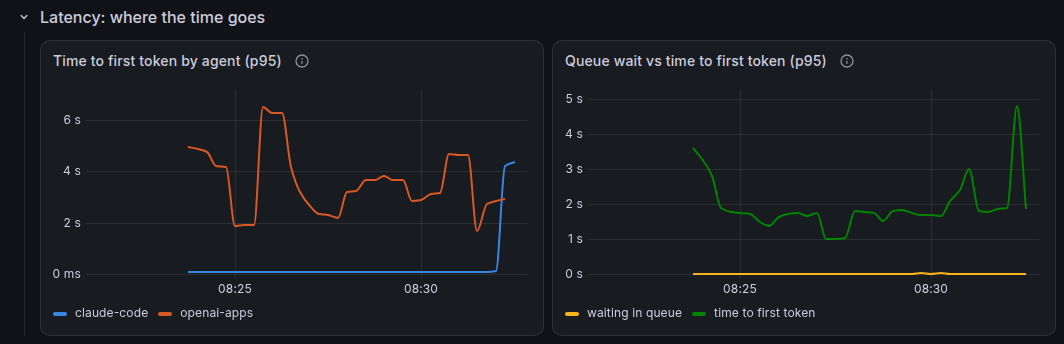
The same eight minutes. Left: Kong’s time to first token per consumer. The claude-code line stays near zero
because it is really the time to the response headers (#15051). The openai-apps line is higher partly because its
non-streamed requests count the whole answer. Right: SGLang’s own time to first token, 1 to 2 seconds at the 95th
percentile.
So for an LLM route I now read the numbers like this:
| Question | Where I look |
|---|---|
| Is the gateway slow? | kong_kong_latency_ms |
| How long until the user sees text? | the model server’s own time to first token. Kong’s kong_ai_llm_ttft_latency_ms only if that upstream sends its headers together with the first token |
| How fast does the answer flow once it starts? | kong_ai_llm_tpot_latency_ms, the time per output token |
| What did the whole request take? | kong_request_latency_ms, or latencies.request in the log |
For a request that is not streamed, the “first token” is the whole answer, so its time to first token equals the whole response time.
Check where the histogram stops
Prometheus histograms count values into fixed buckets, and percentiles are estimated from them. In Kong 3.16 the largest bucket for time to first token is 30 seconds. Time per token stops at 10 seconds, and upstream and total latency at 60 seconds. Anything above the largest bucket is counted, but only as “more than that”. So when a p95 line sits flat at exactly 30 seconds, it means “30 seconds or more”.
With coding agents that is not hypothetical. A long session can send prompts of well over 100,000 tokens, and processing that much input before the first token takes a while. That is one more reason I read the time to first token from SGLang, whose histogram goes to 400 seconds.
Tokens mean something different on each side
The gateway counts what was sent. In the eight-minute run, the claude-code consumer sent 4.1 million prompt tokens
and got back 80,000, about 51 to 1. Coding agents resend their whole conversation on every turn, so the prompt is
most of the traffic. The OpenAI scripts, asking short questions, went the other way: 9,300 tokens in, 25,900 out.
The model server sees a different picture. SGLang keeps recently used prompts in a prefix cache, and a prompt that starts with the same conversation as the last turn doesn’t have to be computed again. Over the same eight minutes SGLang computed 0.76 million prompt tokens and took 3.34 million from its cache, so 81% of the prompt never had to be computed again. Kong’s prompt-token count and SGLang’s own were within 1% of each other: the two sides agree on what came in, and differ on what it cost. Neither side is wrong. Kong counts what the application asked for, which is what you would bill or limit. SGLang shows what the GPUs actually had to do. Put next to each other, they explain why a token-heavy agent may cost much less GPU time than its token count suggests, as long as its prompts reuse the cache.
When something does go wrong
The day after I set this up, SGLang crashed overnight on an idle server. Afterwards, the dashboards showed what each
layer had seen. Nobody sent anything through Kong overnight, so the gateway had nothing to report. The checks on the
model server noticed within four minutes: Prometheus could no longer scrape SGLang, and a small test request sent
straight to it failed. The next requests from the claude-code consumer came back from Kong as 502s, labeled with
that consumer. The cause wasn’t in any of those places: it was a CUDA error in SGLang’s log and a GPU error in the kernel log
on bigai.
That is the same lesson as the last post, over a longer stretch of time. The gateway is the best place to see that something is wrong and who it affects. It is usually not the place that knows why. And when nobody is calling, it has nothing to say, so the model server needs its own checks.
What I would write down for next time
- Turn the metrics on deliberately. Most of the Prometheus plugin’s detailed metrics are off by default, and
ai_metricsis a separate switch. ai-proxy also needslog_statisticsfor token counts. - Expect the AI series only after traffic. No AI metrics in
/metricsright after a restart is normal. - Use the AI metrics for “which agent”. The general latency histograms have no consumer label.
- For streams, upstream latency ends at the response headers, and in Kong 3.16 so does time to first token on
routes with
response_buffering: false(#15051). Check when the model server sends its headers before trusting either as “time until the user saw text”. - Check the top bucket before trusting a percentile. TTFT stops at 30 s, upstream and total at 60 s.
- A consumer is a key, not a program. One consumer per application keeps the metrics honest; otherwise the User-Agent in the request log can split them.
- Put the gateway next to the model server. Kong says who sent what and when; the model server says what it cost.
What is in the box
| Piece | Version | Role |
|---|---|---|
| Kong Gateway | 3.16.0.1 (kong/kong-gateway image), DB-less, in Docker on a Proxmox VM |
key-auth, rate-limiting, ai-proxy, prometheus, file-log |
| Prometheus | 3.15 | collects Kong’s, SGLang’s and the GPUs’ metrics every 15 s, keeps 30 days |
| Loki + Grafana Alloy | 3.7 / 1.20 | Kong’s request log, one JSON line per request |
| Grafana | 13.2 | the dashboards |
| NVIDIA DCGM exporter | 4.8 | GPU activity, power, temperature, fans |
| SGLang + Qwen 3.8 Flash Next | the server from my earlier posts, on bigai | every answer |
| Claude Code | 2.1.300 | one of the agents, through Kong |
The usual caveats apply: one gateway node, one model, a handful of agents on a quiet LAN, and only what I could see from the outside. There is more in Kong for this than I used. The OpenTelemetry plugin can trace a request through the gateway, and Konnect has its own analytics; I haven’t tried either yet. Next I want to use these dashboards for the thing they made obvious: several agents compete for one model server that runs at most eight requests at a time. That makes Kong’s traffic controls, token-based limits in particular, my next experiment.